Automation Platform > Deployment & hosting
Self-hosting overview
# Self-hosting overview Self-hosting lets your team run cloud agent workloads on your own infrastructure instead of Warp-managed servers. You control the execution environment, compute resources, and network access. Repository clones, source files, build artifacts, runtime secrets, and agent execution workspaces stay on your infrastructure, and agents can reach services behind your VPN or firewall. **New to self-hosting?** Start with the [Self-hosting quickstart](/platform/self-hosting/quickstart/) to get a managed worker running on Docker in under 10 minutes. **Want a CLI-only path with no Docker requirement?** Jump straight to the [Unmanaged quickstart](/platform/self-hosting/unmanaged/#unmanaged-quickstart) to run `oz agent run` directly on any host. :::note **Enterprise feature**: Self-hosted agents are available exclusively to teams on an Enterprise plan. To enable self-hosting for your team, [contact sales](https://www.warp.dev/contact-sales). ::: ## Managed vs unmanaged Self-hosting has two architectures. The core distinction is **who orchestrates agent runs** — not who owns the compute. Both models keep code and execution on your infrastructure. * **Managed** — The Automation Platform orchestrates agent runs. You run `oz-agent-worker` on your infrastructure; it connects to the Automation Platform and waits for work. [Slack](/platform/integrations/slack/) mentions, Linear comments, [schedules](/platform/triggers/scheduled-agents/), API calls, and `oz agent run-cloud` commands route tasks to the worker. The Docker, Kubernetes, and Direct backends execute tasks on worker infrastructure. The Command backend dispatches tasks to an external runtime. Similar to a [GitHub self-hosted runner](https://docs.github.com/en/actions/hosting-your-own-runners). * **Unmanaged** — You orchestrate agent runs. You invoke `oz agent run` directly from your existing CI pipeline, Kubernetes pod, VM, or dev box. The Automation Platform provides session tracking and observability for each run, but does not start or stop agents for you. ### At a glance | Aspect | **Managed** | **Unmanaged** | | --- | --- | --- | | **Who triggers runs** | The Automation Platform (Slack, Linear, schedules, API, `run-cloud`) | Your system (CI, cron, scripts) | | **What runs on your infra** | `oz-agent-worker`, either long-lived or started for one externally allocated job | One-shot `oz agent run` invocations | | **OS support** | Linux (macOS/Windows coming) | Linux, macOS, Windows | | **Execution isolation** | Docker container, Kubernetes Job, direct host, or your external runtime | Whatever your host provides | | **Automatic environment setup** | Docker, Kubernetes, and Direct: yes; Command: the external runtime applies the supplied task configuration | No (you manage it) | | **Session tracking and steering** | Yes | Yes | The two architectures are not mutually exclusive. Some teams run managed workers for integration-triggered work and unmanaged agents in CI pipelines. The deployment models diagram on [Deployment patterns](/platform/deployment-patterns/) compares what runs where in each model. ## How self-hosting works Warp uses a split-plane architecture: **execution happens on your infrastructure**, while **orchestration, session management, and LLM inference route through Warp's backend**. Agent interactions — including code context in session transcripts and LLM prompts — transit Warp's control plane under [Zero Data Retention (ZDR)](/enterprise/security-and-compliance/security-overview/#zero-data-retention-zdr) agreements. Warp does not persistently store your source code or train on it. If your security requirement is "repository clones and execution must stay on our infrastructure," self-hosting is designed for that. If your requirement is "no code context can ever route through Warp or an external LLM provider," review [Security and networking](/platform/self-hosting/security-and-networking/) with your Warp account team before deploying.  The [self-hosted execution flow](/platform/architecture/#self-hosted-execution-flow) reference explains each numbered step in the diagram. With any self-hosted architecture: * **Agent runs are tracked and steerable** — View status, metadata, and session transcripts in the <a href=https://oz.warp.dev>cloud agent dashboard</a>, the Warp app, or via the [API/SDK](/reference/api-and-sdk/). Authorized teammates can attach to running sessions to monitor or steer agents. * **Connectivity to Warp's backend is required** — Agents need outbound access to Warp for orchestration, session storage, and LLM inference. No inbound ports need to be opened. * **Resource limits are controlled by your infrastructure** — Concurrency and compute are only limited by the machines you provision, not by Warp. :::note Enterprise teams that need full control over LLM inference routing can use [Bring Your Own LLM (BYOLLM)](/enterprise/enterprise-features/bring-your-own-llm/) to route inference through their own cloud provider accounts. Cloud agent support varies by provider; see each provider's setup guide for details. ::: --- ## Choosing an architecture :::caution **OS support:** The managed architecture is **Linux-only** today (macOS and Windows support is coming). If you need agents to run on macOS or Windows, use the [unmanaged](/platform/self-hosting/unmanaged/) architecture, which works on any platform Warp supports. ::: Use these questions to decide between managed and unmanaged: 1. **Do you need agents to run on Windows or macOS?** * Yes → Use the [unmanaged](/platform/self-hosting/unmanaged/) architecture. Managed is Linux-only today. * No, Linux works → Continue to the next question. 2. **How should runs start?** * The Automation Platform should route each run to a worker that manages execution → Use the [managed](#managed-architecture) architecture, then choose a backend below. * The Automation Platform, with your existing scheduler or runtime owning the compute lifecycle → Use a [managed external-orchestrator pattern](/platform/self-hosting/external-orchestrators/). * Your system, by invoking `oz agent run` directly → Use the [unmanaged](/platform/self-hosting/unmanaged/) architecture. ### Choosing a managed backend The managed architecture supports four backends for task handling. Docker, Kubernetes, and Direct execute tasks on worker infrastructure. Command dispatches tasks to an external runtime. 1. **Should a long-lived worker hand each task to an existing job API, queue, or runtime?** * Yes → Use the [Command backend](/platform/self-hosting/external-orchestrators/#delegating-runs-with-the-command-backend). * No → Continue. 2. **Does an external scheduler start a dedicated worker process for each job?** * Yes → Use the [Direct backend in one-shot mode](/platform/self-hosting/external-orchestrators/#running-a-direct-worker-in-one-shot-mode). * No → Continue. 3. **Are you deploying the worker into a Kubernetes cluster?** * Yes → Use the [Kubernetes backend](/platform/self-hosting/managed-kubernetes/). Each task runs as a Kubernetes Job in your cluster; install with the included Helm chart. * No → Continue. 4. **Is Docker available on your worker host?** * Yes → Use the [Docker backend](/platform/self-hosting/managed-docker/) (default). Tasks run in isolated containers. * No → Use the [Direct backend](/platform/self-hosting/managed-direct/). Tasks run directly on the host. --- ## Managed architecture With the managed architecture, you run `oz-agent-worker` on your infrastructure. The worker connects to the Automation Platform's backend, waits for tasks, and handles them with one of four backends: * **[Docker backend](/platform/self-hosting/managed-docker/)** (default) — Runs each task in an isolated Docker container. * **[Kubernetes backend](/platform/self-hosting/managed-kubernetes/)** — Runs each task as a Kubernetes Job in your cluster. * **[Direct backend](/platform/self-hosting/managed-direct/)** — Runs each task directly on the host without a container runtime. * **[Command backend](/platform/self-hosting/external-orchestrators/#delegating-runs-with-the-command-backend)** — Dispatches each task to an external runtime through a configured command. The worker does not run the agent on its host. The managed architecture enables full orchestration by the Automation Platform — it can remotely start agents via Slack, Linear, the <a href=https://oz.warp.dev>Oz web app</a>, the API/SDK, and the `oz agent run-cloud` command. Agents can access resources through volume mounts (Docker), Kubernetes-native configuration (Kubernetes), the worker host (Direct), or the configuration applied by an external runtime (Command). ## Unmanaged architecture With the [unmanaged architecture](/platform/self-hosting/unmanaged/), you run `oz agent run` inside your own orchestrator or dev environment. This works on any platform Warp supports (Linux, macOS, Windows), with no dependency on Docker or any other sandboxing platform. You're responsible for executing `oz agent run` on your infrastructure — similar to how you'd integrate Claude Code or Codex CLI. The agent runs directly on the host, which could itself be a Kubernetes pod, VM, container, or CI runner. --- ## Routing runs to self-hosted workers This section applies to **all managed backends**. Once a worker is connected, route cloud agent runs to it by specifying the `--host` flag (or equivalent) with your worker ID. The `--host` value must match the `--worker-id` of a connected worker exactly. Docker, Kubernetes, and Direct workers execute the assigned task on worker infrastructure; Command workers dispatch it to the configured external runtime. :::note Unmanaged runs don't need routing — you invoke `oz agent run` directly on the host where you want the agent to execute. Routing is only relevant for managed workers. ::: ### From the CLI ```bash oz agent run-cloud --prompt "Refactor the authentication module" --host "my-worker" ``` You can combine `--host` with any other `run-cloud` flags, such as `--environment`, `--model`, `--mcp`, `--skill`, `--computer-use`, and `--attach`. ### From scheduled agents When creating or updating a schedule, specify the host: ```bash oz schedule create --name "daily-cleanup" \ --cron "0 9 * * *" \ --prompt "Run dead code cleanup" \ --environment ENV_ID \ --host "my-worker" oz schedule update SCHEDULE_ID --host "my-worker" ``` ### From integrations When creating or updating an integration, specify the host: ```bash oz integration create slack --host "my-worker" ... oz integration update linear --host "my-worker" ... ``` All tasks created through that integration route to your self-hosted worker. ### From the API and SDKs When creating a run via the [Oz API & SDK](/reference/api-and-sdk/), include `worker_host` in the config: ```bash curl -X POST https://app.warp.dev/api/v1/agent/run \ --header 'Authorization: Bearer YOUR_API_KEY' \ --header 'Content-Type: application/json' \ --data '{ "prompt": "Refactor the authentication module", "config": { "environment_id": "ENV_ID", "worker_host": "my-worker" } }' ``` ### From the web UI When creating a run, schedule, or integration in the <a href=https://oz.warp.dev>Oz web app</a>, select your self-hosted worker from the host dropdown. --- ## Environments with self-hosted workers Self-hosted workers fully support [environments](/platform/environments/). When a task specifies an environment, the worker resolves the Docker image, clones the repositories, runs setup commands, and executes the agent inside the prepared container or Kubernetes Job. The same environment can be used for both Warp-hosted and self-hosted runs without modification. If your agents need custom tools, binaries, scripts, or system packages, add them to the environment's Docker image. See [Environments](/platform/environments/) for details on creating and configuring custom images. :::note With the Kubernetes backend, setting a [`default_image`](/platform/self-hosting/reference/#kubernetes-backend-config) on the worker lets you skip creating a Warp environment when all your tasks use the same base image. ::: :::caution Musl-based Docker images (such as Alpine Linux) are not supported as task images. The agent runtime requires glibc. Use glibc-based images like Debian, Ubuntu, or the default (non-Alpine) variants of official Docker Hub images. ::: ## Monitoring runs Self-hosted runs have the same observability as Warp-hosted runs: * **Run history** — View task status, history, and metadata in the cloud agent dashboard, hosted in the <a href=https://oz.warp.dev>Oz web app</a>, or filter by source and status in the [Agent Management Panel](/platform/managing-cloud-agents/). * **Session sharing** — Authorized teammates can attach to running tasks to [monitor progress](/platform/viewing-cloud-agent-runs/). * **APIs and SDKs** — Query task history and build monitoring using the [Oz API & SDK](/reference/api-and-sdk/). For infrastructure-level observability, the `oz-agent-worker` daemon can export OpenTelemetry metrics (worker health, task throughput, capacity saturation) to Prometheus, an OTLP collector, or the console. See [Monitoring](/platform/self-hosting/monitoring/) for setup, the full metric catalog, and sample PromQL queries. --- ## Related pages * [Self-hosting quickstart](/platform/self-hosting/quickstart/) — Get a managed worker running in ~10 minutes. * [Unmanaged](/platform/self-hosting/unmanaged/) — Run `oz agent run` in your CI, K8s, or dev environment. * [Managed: Docker](/platform/self-hosting/managed-docker/) — Default managed setup with the Docker backend. * [Managed: Kubernetes](/platform/self-hosting/managed-kubernetes/) — Managed setup with the Kubernetes backend and Helm chart. * [Managed: Direct](/platform/self-hosting/managed-direct/) — Managed setup with no container runtime. * [External orchestrators](/platform/self-hosting/external-orchestrators/) — Run a Direct worker in one-shot mode or dispatch tasks with the Command backend. * [Self-hosted worker reference](/platform/self-hosting/reference/) — CLI flags and config file schema. * [Monitoring](/platform/self-hosting/monitoring/) — OpenTelemetry metrics for worker health, task throughput, and capacity. * [Security and networking](/platform/self-hosting/security-and-networking/) — Data boundaries, network egress, and security considerations. * [Troubleshooting](/platform/self-hosting/troubleshooting/) — Worker won't start, tasks not picked up, and other common issues. * [Deployment patterns](/platform/deployment-patterns/) — How self-hosting compares to CLI-only and Warp-hosted deployment. * [Scheduled agents](/platform/triggers/scheduled-agents/) — Route recurring cloud agent work to a self-hosted worker with `--host`. * [Integrations](/platform/integrations/) — Point Slack, Linear, and other triggers at a self-hosted worker. * [Managing cloud agents](/platform/managing-cloud-agents/) — Inspect self-hosted runs alongside Warp-hosted ones. * [Environments](/platform/environments/) — Define the runtime context for agent tasks. * [Customizing workspace snapshots](/platform/handoff/snapshots/) — Configure end-of-run snapshots so handoff works when running outside the bundled cloud agent image.Tell me about this feature: https://docs.warp.dev/platform/self-hosting/Run cloud agents on your own infrastructure with a managed worker daemon or unmanaged CLI-based execution you control.
Self-hosting lets your team run cloud agent workloads on your own infrastructure instead of Warp-managed servers. You control the execution environment, compute resources, and network access. Repository clones, source files, build artifacts, runtime secrets, and agent execution workspaces stay on your infrastructure, and agents can reach services behind your VPN or firewall.
New to self-hosting? Start with the Self-hosting quickstart to get a managed worker running on Docker in under 10 minutes.
Want a CLI-only path with no Docker requirement? Jump straight to the Unmanaged quickstart to run oz agent run directly on any host.
Managed vs unmanaged
Section titled “Managed vs unmanaged”Self-hosting has two architectures. The core distinction is who orchestrates agent runs — not who owns the compute. Both models keep code and execution on your infrastructure.
- Managed — The Automation Platform orchestrates agent runs. You run
oz-agent-workeron your infrastructure; it connects to the Automation Platform and waits for work. Slack mentions, Linear comments, schedules, API calls, andoz agent run-cloudcommands route tasks to the worker. The Docker, Kubernetes, and Direct backends execute tasks on worker infrastructure. The Command backend dispatches tasks to an external runtime. Similar to a GitHub self-hosted runner. - Unmanaged — You orchestrate agent runs. You invoke
oz agent rundirectly from your existing CI pipeline, Kubernetes pod, VM, or dev box. The Automation Platform provides session tracking and observability for each run, but does not start or stop agents for you.
At a glance
Section titled “At a glance”| Aspect | Managed | Unmanaged |
|---|---|---|
| Who triggers runs | The Automation Platform (Slack, Linear, schedules, API, run-cloud) | Your system (CI, cron, scripts) |
| What runs on your infra | oz-agent-worker, either long-lived or started for one externally allocated job | One-shot oz agent run invocations |
| OS support | Linux (macOS/Windows coming) | Linux, macOS, Windows |
| Execution isolation | Docker container, Kubernetes Job, direct host, or your external runtime | Whatever your host provides |
| Automatic environment setup | Docker, Kubernetes, and Direct: yes; Command: the external runtime applies the supplied task configuration | No (you manage it) |
| Session tracking and steering | Yes | Yes |
The two architectures are not mutually exclusive. Some teams run managed workers for integration-triggered work and unmanaged agents in CI pipelines. The deployment models diagram on Deployment patterns compares what runs where in each model.
How self-hosting works
Section titled “How self-hosting works”Warp uses a split-plane architecture: execution happens on your infrastructure, while orchestration, session management, and LLM inference route through Warp’s backend. Agent interactions — including code context in session transcripts and LLM prompts — transit Warp’s control plane under Zero Data Retention (ZDR) agreements. Warp does not persistently store your source code or train on it.
If your security requirement is “repository clones and execution must stay on our infrastructure,” self-hosting is designed for that. If your requirement is “no code context can ever route through Warp or an external LLM provider,” review Security and networking with your Warp account team before deploying.
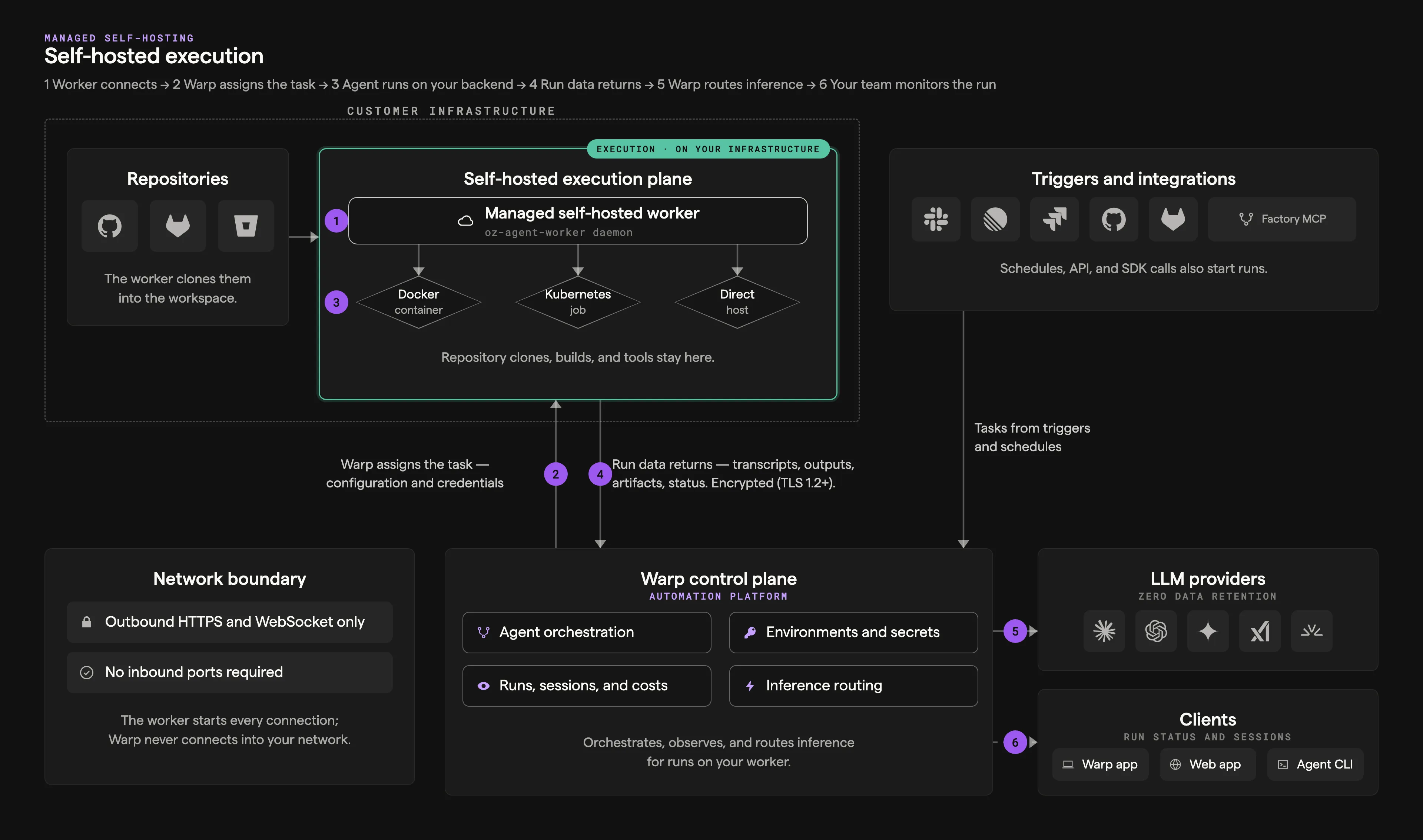
The self-hosted execution flow reference explains each numbered step in the diagram.
With any self-hosted architecture:
- Agent runs are tracked and steerable — View status, metadata, and session transcripts in the cloud agent dashboard, the Warp app, or via the API/SDK. Authorized teammates can attach to running sessions to monitor or steer agents.
- Connectivity to Warp’s backend is required — Agents need outbound access to Warp for orchestration, session storage, and LLM inference. No inbound ports need to be opened.
- Resource limits are controlled by your infrastructure — Concurrency and compute are only limited by the machines you provision, not by Warp.
Choosing an architecture
Section titled “Choosing an architecture”Use these questions to decide between managed and unmanaged:
- Do you need agents to run on Windows or macOS?
- Yes → Use the unmanaged architecture. Managed is Linux-only today.
- No, Linux works → Continue to the next question.
- How should runs start?
- The Automation Platform should route each run to a worker that manages execution → Use the managed architecture, then choose a backend below.
- The Automation Platform, with your existing scheduler or runtime owning the compute lifecycle → Use a managed external-orchestrator pattern.
- Your system, by invoking
oz agent rundirectly → Use the unmanaged architecture.
Choosing a managed backend
Section titled “Choosing a managed backend”The managed architecture supports four backends for task handling. Docker, Kubernetes, and Direct execute tasks on worker infrastructure. Command dispatches tasks to an external runtime.
- Should a long-lived worker hand each task to an existing job API, queue, or runtime?
- Yes → Use the Command backend.
- No → Continue.
- Does an external scheduler start a dedicated worker process for each job?
- Yes → Use the Direct backend in one-shot mode.
- No → Continue.
- Are you deploying the worker into a Kubernetes cluster?
- Yes → Use the Kubernetes backend. Each task runs as a Kubernetes Job in your cluster; install with the included Helm chart.
- No → Continue.
- Is Docker available on your worker host?
- Yes → Use the Docker backend (default). Tasks run in isolated containers.
- No → Use the Direct backend. Tasks run directly on the host.
Managed architecture
Section titled “Managed architecture”With the managed architecture, you run oz-agent-worker on your infrastructure. The worker connects to the Automation Platform‘s backend, waits for tasks, and handles them with one of four backends:
- Docker backend (default) — Runs each task in an isolated Docker container.
- Kubernetes backend — Runs each task as a Kubernetes Job in your cluster.
- Direct backend — Runs each task directly on the host without a container runtime.
- Command backend — Dispatches each task to an external runtime through a configured command. The worker does not run the agent on its host.
The managed architecture enables full orchestration by the Automation Platform — it can remotely start agents via Slack, Linear, the Oz web app, the API/SDK, and the oz agent run-cloud command. Agents can access resources through volume mounts (Docker), Kubernetes-native configuration (Kubernetes), the worker host (Direct), or the configuration applied by an external runtime (Command).
Unmanaged architecture
Section titled “Unmanaged architecture”With the unmanaged architecture, you run oz agent run inside your own orchestrator or dev environment. This works on any platform Warp supports (Linux, macOS, Windows), with no dependency on Docker or any other sandboxing platform.
You’re responsible for executing oz agent run on your infrastructure — similar to how you’d integrate Claude Code or Codex CLI. The agent runs directly on the host, which could itself be a Kubernetes pod, VM, container, or CI runner.
Routing runs to self-hosted workers
Section titled “Routing runs to self-hosted workers”This section applies to all managed backends. Once a worker is connected, route cloud agent runs to it by specifying the --host flag (or equivalent) with your worker ID. The --host value must match the --worker-id of a connected worker exactly. Docker, Kubernetes, and Direct workers execute the assigned task on worker infrastructure; Command workers dispatch it to the configured external runtime.
From the CLI
Section titled “From the CLI”oz agent run-cloud --prompt "Refactor the authentication module" --host "my-worker"You can combine --host with any other run-cloud flags, such as --environment, --model, --mcp, --skill, --computer-use, and --attach.
From scheduled agents
Section titled “From scheduled agents”When creating or updating a schedule, specify the host:
oz schedule create --name "daily-cleanup" \  --cron "0 9 * * *" \  --prompt "Run dead code cleanup" \  --environment ENV_ID \  --host "my-worker"
oz schedule update SCHEDULE_ID --host "my-worker"
From integrations
Section titled “From integrations”When creating or updating an integration, specify the host:
oz integration create slack --host "my-worker" ...oz integration update linear --host "my-worker" ...All tasks created through that integration route to your self-hosted worker.
From the API and SDKs
Section titled “From the API and SDKs”When creating a run via the Oz API & SDK, include worker_host in the config:
curl -X POST https://app.warp.dev/api/v1/agent/run \ --header 'Authorization: Bearer YOUR_API_KEY' \ --header 'Content-Type: application/json' \ --data '{ "prompt": "Refactor the authentication module", "config": { "environment_id": "ENV_ID", "worker_host": "my-worker" } }'From the web UI
Section titled “From the web UI”When creating a run, schedule, or integration in the Oz web app, select your self-hosted worker from the host dropdown.
Environments with self-hosted workers
Section titled “Environments with self-hosted workers”Self-hosted workers fully support environments. When a task specifies an environment, the worker resolves the Docker image, clones the repositories, runs setup commands, and executes the agent inside the prepared container or Kubernetes Job.
The same environment can be used for both Warp-hosted and self-hosted runs without modification. If your agents need custom tools, binaries, scripts, or system packages, add them to the environment’s Docker image. See Environments for details on creating and configuring custom images.
Monitoring runs
Section titled “Monitoring runs”Self-hosted runs have the same observability as Warp-hosted runs:
- Run history — View task status, history, and metadata in the cloud agent dashboard, hosted in the Oz web app, or filter by source and status in the Agent Management Panel.
- Session sharing — Authorized teammates can attach to running tasks to monitor progress.
- APIs and SDKs — Query task history and build monitoring using the Oz API & SDK.
For infrastructure-level observability, the oz-agent-worker daemon can export OpenTelemetry metrics (worker health, task throughput, capacity saturation) to Prometheus, an OTLP collector, or the console. See Monitoring for setup, the full metric catalog, and sample PromQL queries.
Related pages
Section titled “Related pages”- Self-hosting quickstart — Get a managed worker running in ~10 minutes.
- Unmanaged — Run
oz agent runin your CI, K8s, or dev environment. - Managed: Docker — Default managed setup with the Docker backend.
- Managed: Kubernetes — Managed setup with the Kubernetes backend and Helm chart.
- Managed: Direct — Managed setup with no container runtime.
- External orchestrators — Run a Direct worker in one-shot mode or dispatch tasks with the Command backend.
- Self-hosted worker reference — CLI flags and config file schema.
- Monitoring — OpenTelemetry metrics for worker health, task throughput, and capacity.
- Security and networking — Data boundaries, network egress, and security considerations.
- Troubleshooting — Worker won’t start, tasks not picked up, and other common issues.
- Deployment patterns — How self-hosting compares to CLI-only and Warp-hosted deployment.
- Scheduled agents — Route recurring cloud agent work to a self-hosted worker with
--host. - Integrations — Point Slack, Linear, and other triggers at a self-hosted worker.
- Managing cloud agents — Inspect self-hosted runs alongside Warp-hosted ones.
- Environments — Define the runtime context for agent tasks.
- Customizing workspace snapshots — Configure end-of-run snapshots so handoff works when running outside the bundled cloud agent image.